- Published on
WorkBuddy Enters the Scene: Challenges of Working with It
- Authors

- Name
- Huajiang Wang
Not long ago, I had just finished gathering my thoughts on OpenClaw. In those reflections, while I marveled at the notion of a phone as a "remote robotic arm," a certain hesitation lingered: perhaps it would be more grounding to entrust such rigorous, long-term "structured" tasks to a tool as steady as Trae.
Yet, news of WorkBuddy's public beta arrived sooner than anticipated, its swift emergence catching me somewhat off guard.
Thus, these words took shape—a record of an unexpected encounter with WorkBuddy in the wake of OpenClaw.
I. Beyond the Ideal: Several Inevitable Real-World Problems
Any new tool, especially one linked to "intelligence," brings a bit of excitement upon first contact. But as you use it, some issues that are hard to ignore begin to surface.
1. Fixed Model, Vanishing Choices
WorkBuddy defaults to a specific AI model, which mostly performs adequately for daily Q&A and completions.
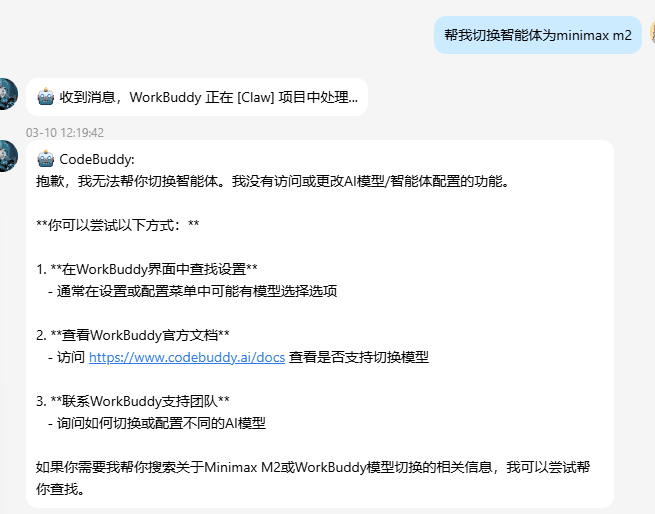
But occasionally, I wish I could switch "thinking," such as moving to a model like MiniMax M2 that might excel in certain tasks, to see if I'd get a different set of solutions. The problem is that currently, WorkBuddy does not provide a model-switching entry for ordinary users.
2. Peak-Time Instability: More Frustrating Than the Errors Themselves
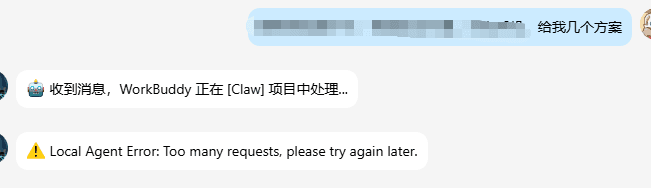
AI services slowing down or timing out during peak hours is an old story. But in WorkBuddy, this problem feels particularly glaring and directly tests whether it can be "trusted long-term."
During periods of high usage, responses slow down significantly, sometimes resulting in direct errors: "Request timed out, please try again." More troublingly, once a request fails, it often "evaporates" the accumulated conversation context along with it.
Once, I asked WorkBuddy to help refactor a complex module. After over a dozen turns of dialogue, we finally cleared up the issues and the solution was taking shape. Just when I thought we could wrap it up, the server errored—the context was completely lost, leaving only a cold error prompt.
3. Locked Extensibility, Compressed Imagination
For many developers, whether a tool is "good" depends not just on its current features but on where its boundaries are drawn.
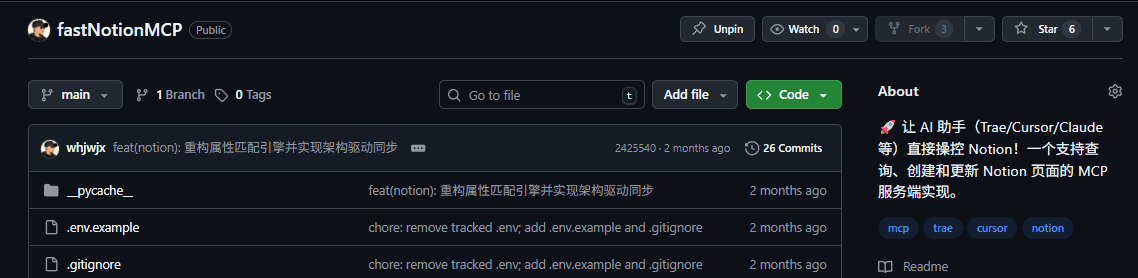
Out of curiosity, I tried to connect a custom MCP (Model Context Protocol) plugin in WorkBuddy, hoping to integrate my familiar toolchain, such as connecting fastNotionMCP or interfacing with existing data services. It turns out that currently, WorkBuddy does not support users freely adding MCPs or plugins.
4. Files Stuck Locally, Stories Stuck Halfway
There's another problem that sounds very trivial but is extremely practical: how to easily move content written in WorkBuddy from that computer to other devices?
One day at the office, I used WorkBuddy to slowly polish a blog post. I felt a sense of accomplishment the moment I shut down.
On the subway, I pulled out my phone to read it again, only to realize: that article was still locked in the office computer, and the only thing that left with me was an empty phone screen.
WorkBuddy has no built-in email sending or one-click cloud sync. Starting a local HTTP service only works within the internal network; once I leave the office network, my phone can no longer reach it. The final solution was to ask a friend to forward the file via WeChat.
This isn't a technical challenge, of course, but compared to the grand narrative of "deep AI integration," it feels a bit ridiculous: we can enjoy complex intelligent completions and task planning locally, yet we still have to rely on "manual relays" for basic file transfer.
5. Incomplete Network Access Makes Information One-Sided
In some scenarios, I'd hope WorkBuddy could check the latest technical documentation for me or look at an open-source project's implementation on GitHub. But in reality, its access to some websites is unstable, especially critical sites like GitHub, which often time out.
Behind this lie broader issues of network environments, access policies, and compliance, which shouldn't be simply blamed on a single product. But for the end user, the felt reality is simple: sometimes, it cannot see the part of the world I want it to see.
II. Within the Limits: Finding Self-Help Methods
Faced with these shortcomings, I didn't immediately uninstall WorkBuddy. Instead, I set it aside for a few days to cool off, then explored some self-help methods within its existing boundaries.
1. Using Third-Party Platforms as "Bridges"
For the problem of cross-device file access, a simple but effective approach is to introduce existing third-party platforms to "host" the content generated by WorkBuddy.
Tools like Yuque, Tencent Docs, GitHub Gist, and Notion each have different strengths:
- Yuque: Smooth access in China, Markdown-friendly, suitable for medium-to-long-term storage.
- Tencent Docs: Can be opened directly in WeChat, suitable for "quick glances on the road."
- GitHub Gist: Good for staying connected to the code world, no pressure for long-term storage.
- Notion: Great cross-platform sync experience, though with a slight initial configuration hurdle.
None are perfect, but they are enough to solve concrete and simple needs like "I want to see the content I just wrote on my phone."
2. Using Scripts to Fill "Missing Capabilities"
While WorkBuddy currently doesn't support users freely adding MCPs or plugins, this doesn't mean all extensibility is a dead end.
Take Notion as an example: if you want to automatically sync content generated in WorkBuddy, you can write a set of Python scripts locally in advance, using the Notion API for insertion or update operations, and configure the Token and Database ID. Later, when an article is finished in WorkBuddy, you just need to call that script to push the content to Notion, and it will naturally appear on your phone or tablet.
This isn't as elegant as "native integration," but it's a pragmatic compromise: let WorkBuddy focus on the local creative experience and leave the external connectivity to scripts. Configure once, reuse many times—in the long run, it counts as a "cumulative solution."
3. Explaining the Problems Clearly, Then Giving It Time
As for issues like the inability to switch models or service instability during peak hours, there's little a single user can do for immediate results. What I can do is record the scenarios, frequency, and impact when I encounter problems, and then provide feedback through official channels. This sounds a bit slow, but it might be more useful than simple complaints—many product improvements grow out of these seemingly trivial usage records.
III. The Merits Still Exist, Just Need to Be Viewed in the Right Context
Having said so much about the shortcomings, it's easy to get the impression that WorkBuddy is a tool where "problems outweigh value." In fact, if we look only at the parts it has done well, it's still worth mentioning.
It has delivered good results in at least the following areas:
- Code completion is smart enough: It understands context and doesn't just mechanically fill in identifiers; it helps you complete the code you would have written anyway, just saving you the time.
- Three work modes are clearly divided: The boundaries between Ask, Craft, and Plan are clear at a glance, giving you definite expectations of "what it's about to do."
- Interface design is restrained and not flashy: The learning cost is low, and you don't need to learn a whole new set of habits to start using it.
- Basic cloud service integration is already laid out: Support for ecosystems like CloudBase and Supabase gives it a chance to become a one-stop development entry in some projects.
These merits don't disappear because of the shortcomings; it's just that they are weighed on the same scale as those real-world constraints.
IV. Expectations for WorkBuddy Are Expectations for AI Coding Assistants
If I were to summarize my expectations for WorkBuddy in a few sentences, they would fall into these directions:
- Don't drop the ball at critical moments: Service stability is the foundation of all "intelligent capabilities."
- Give users a bit more room in choices: Whether it's model switching or extension interfaces, try to leave some room for customization.
- Get a bit closer to real scenarios: File transfer, cross-device access, and information acquisition in restricted network environments—these seemingly small details often determine if a tool can truly integrate into daily life.
From another perspective, the competition among AI coding assistants might not be about whose model is stronger or has more parameters, but about who knows better how to leave a comfortable distance between humans and tools.
WorkBuddy is certainly not perfect now; it has highlights and shortcomings. But at least it has done something meaningful: trying to make AI no longer just a dialog box in a browser, but a "permanent colleague" in the editor.
V. Final Thoughts: Beyond Tools, There Are People and Relationships
This article is not a cold list of features, nor a hasty verdict. It is just a record of my brief time with WorkBuddy during a specific period.
There were surprises and disappointments; moments of smooth flow and the frustration of cleared contexts.
In my daily life, Trae is more like an "old colleague" who has already integrated into the workflow, good at tackling complex code and organizing long-term context; WorkBuddy is the new partner who just joined the team, trying to settle AI into the editor itself. Writing about OpenClaw was more about imagining how far the "hand" could reach; writing about WorkBuddy is about observing how AI sits at the desk. Putting these two together with Trae outlines a spectrum from remote control to editor integration to deep engineering assistants.
I'm in no hurry to label WorkBuddy as "good" or "bad." The direction of AI coding assistants is still changing rapidly, and today's defects might have a decent patch in the next update.
To me, what's more important is slowly finding a new way to coexist: neither over-reliant nor over-guarded; seeing the limitations of the tool while acknowledging the real help it brings.
After all, tools are ultimately meant to be used, not to be worshiped or hated. As for where WorkBuddy and Trae will each go, let time and the people who use them answer that.